ThatSlow.W204

W-BodyTech Guru

WBT+ Member
Social Media Manager
Reputation: 31%
Joined
Feb 23, 2023
Messages
139

CTS-V Brembo Front Brake Upgrade for W-Body Cars

Official WBodyTech Guide • Fitment • Questions • Community Results
​


Complete Installation Guide

The full, photo-based installation guide is maintained on WBodyTech.com.

► OPEN THE COMPLETE CTS-V BREMBO GUIDE


Parts • Verified Part Numbers • Photos • Tools • Installation • Wheel Fitment • FAQ

​


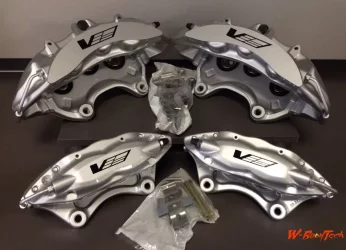
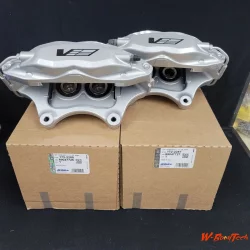
StepbyStep Guide Upgrading Brakes with CTSV Calipers-1.webp


CTS-V 4-Piston Brembos
​


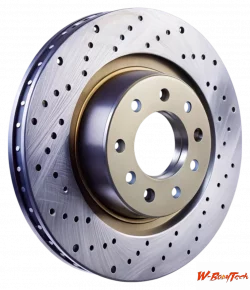
StepbyStep Guide Upgrading Brakes with CTSV Calipers-2.webp


355 mm Mustang Rotor
​


StepbyStep Guide Upgrading Brakes with CTSV Calipers-3.webp


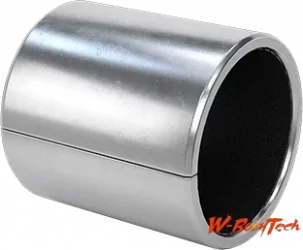
12 → 14 mm Mounting Sleeve
​


StepbyStep Guide Upgrading Brakes with CTSV Calipers-4.webp


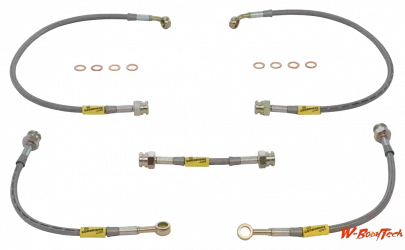
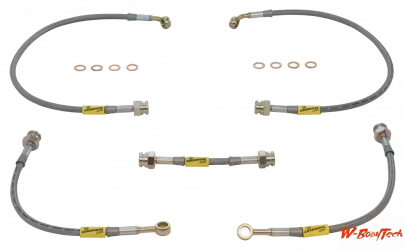
Extended Front Brake Hoses
​

Click any image to open the complete guide.
​


Quick Reference

ComponentReference
Left CTS-V CaliperGM 89047727
Right CTS-V CaliperGM 89047726
355 mm RotorFord 7R3Z-1125-A
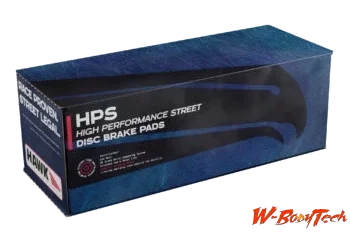
Brake PadsFMSI D1001
Mounting SleevesMcMaster-Carr 6679K16
Caliper BoltsGM 18060356
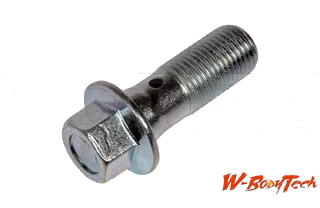
Banjo BoltDorman 14100 • M10 × 1.0
Front HosesGoodridge Longer W-Body fronts • approx. 20.5"


What This Thread Is For

The website is now the main installation guide.

This forum thread is for:

  • Installation questions
  • Confirmed wheel fitment
  • Spacer requirements
  • Completed builds
  • Photos
  • Verified alternate parts
  • Dead or superseded part numbers
  • Troubleshooting
  • Corrections to the main guide

If something useful is discovered here, we can update the main WBodyTech guide so the information stays easy to find.


Need Help Right Now?

For live troubleshooting, we're usually more active on Discord.

► GET LIVE HELP ON DISCORD

But please bring confirmed solutions and fitment results back to the forum.

Discord is where we talk about it.
The forum is where we document it.

​


Confirmed Wheel Fitment Database

If you complete the swap, copy this into your reply:

Code:
Vehicle:
Year:
Model:

Front Calipers:
Rotor:
Brake Pads:
Brake Hoses:

Wheel Brand/Model:
Wheel Diameter:
Wheel Width:
Wheel Offset:
Tire Size:

Spacer Used:
Spacer Thickness:
Extended Studs:

Caliper-to-Spoke Clearance:
Caliper-to-Barrel Clearance:

Any Modifications Required:

Photos:

Problems Encountered:

Solution:

Additional Notes:

Please post even if the setup fits without a spacer or modification.

Confirmed "fits as-is" information is extremely useful.


Important Fitment Notes

  • This is a custom brake conversion.
  • The Mustang rotor is nominally 5x114.3; the W-Body hub is nominally 5x115.
  • The rotor must slide over all five studs freely and sit flat against the hub.
  • Do not force the rotor onto the hub.
  • The fixed Brembo caliper must be centered over the rotor.
  • Do not assume both sides require the same alignment washer stack.
  • Bleeder screws must be at the top.
  • Check brake hose routing through the full steering range.
  • 18-inch wheels are generally recommended, but wheel design determines actual clearance.


W-BodyTech Community

Need the procedure?

Open the Complete WBodyTech Guide

Need help right now?

Join WBodyTech Discord

Finished the install or solved a problem?

Post your results here so the information stays searchable for the next W-Body owner.
​
 

Attachments

  • StepbyStep Guide Upgrading Brakes with CTSV Calipers-1.webp
    StepbyStep Guide Upgrading Brakes with CTSV Calipers-1.webp
    82 KB · Views: 31
  • StepbyStep Guide Upgrading Brakes with CTSV Calipers-2.webp
    StepbyStep Guide Upgrading Brakes with CTSV Calipers-2.webp
    322.1 KB · Views: 33
  • StepbyStep Guide Upgrading Brakes with CTSV Calipers-3.webp
    StepbyStep Guide Upgrading Brakes with CTSV Calipers-3.webp
    83.7 KB · Views: 35
  • StepbyStep Guide Upgrading Brakes with CTSV Calipers-4.webp
    StepbyStep Guide Upgrading Brakes with CTSV Calipers-4.webp
    13 KB · Views: 33
  • StepbyStep Guide Upgrading Brakes with CTSV Calipers-5.webp
    StepbyStep Guide Upgrading Brakes with CTSV Calipers-5.webp
    11 KB · Views: 33
  • StepbyStep Guide Upgrading Brakes with CTSV Calipers-6.webp
    StepbyStep Guide Upgrading Brakes with CTSV Calipers-6.webp
    36.2 KB · Views: 34
  • StepbyStep Guide Upgrading Brakes with CTSV Calipers-7.webp
    StepbyStep Guide Upgrading Brakes with CTSV Calipers-7.webp
    8.4 KB · Views: 32
Last edited by a moderator:

Connect With W-BodyTech

Support • Live Chat • Forums • Social Media • Community


Need Help or Just Want to Hang Out?

W-BodyTech is more than a technical website. We're a community of W-Body owners, builders, enthusiasts, and people who simply enjoy talking cars.

Whether you're troubleshooting a problem, working on a project, looking for parts information, or just want to chat, there are several ways to connect with us.

​


💬 Live Chat & Quick Help

For fast questions, real-time troubleshooting, project updates, and general conversation, Discord is usually the most active place to find us.

► JOIN THE W-BODYTECH DISCORD

Chat about:

• Repairs and troubleshooting
• Builds and modifications
• Parts and fitment
• Performance
• W-Body history
• Other GM platforms
• Cars in general
• Gaming and off-topic conversation

Discord is the best place for live conversation and quick back-and-forth help.
​


📚 W-BodyTech Forums

The forums are the heart of our permanent technical knowledge base.

► VISIT THE W-BODYTECH FORUMS

Use the forums for:

• Technical questions
• Detailed troubleshooting
• Build threads
• How-to information
• Parts and specifications
• Wheel and tire fitment
• Photos and project updates
• Confirmed fixes and solutions

If you solve a problem on Discord, please consider posting the final solution on the forum.

That helps keep useful information searchable instead of letting it disappear into chat history.

Discord is where we talk about it.
The forums are where we document it.

​


🌐 Main Website

Guides, technical information, vehicle information, projects, articles, and more:

► WBODYTECH.COM

​


Follow W-BodyTech

Keep up with new guides, project updates, videos, community features, photos, and other W-BodyTech content.

Instagram

Photos • Builds • Updates

Follow @wbodytech
​
YouTube

Videos • How-Tos • Projects

Subscribe to WBodyTech
​
Facebook Page

News • Posts • Community Updates

Follow W-BodyTech
​
Facebook Group

Community Discussion • Builds • Help

Join the W-BodyTech Group
​


More Ways to Follow Us

W-BodyTech also maintains a presence on additional social platforms.

Reddit •
X / Twitter

Use the social links on WBodyTech.com for the current official account URLs.
​


Show Off Your Ride

We want to see what you're working on.

Post your car, project, build progress, modifications, restoration work, or finished setup on the forum.

Good community submissions may also be featured across W-BodyTech's social media channels.

When posting your ride, include things like:

  • Year
  • Make and model
  • Trim
  • Engine
  • Major modifications
  • Wheel and tire setup
  • Suspension
  • Performance upgrades
  • Photos
  • Anything interesting about the car or its history

Don't worry if the car isn't finished.

Projects are part of the fun.


Help Keep W-Body Knowledge Alive

A lot of useful automotive information has disappeared over the years as old websites, image hosts, Facebook posts, and chat groups have gone offline.

One of W-BodyTech's goals is to keep useful information available and searchable.

You can help by:

  • Posting confirmed repairs and solutions
  • Documenting modifications
  • Sharing part numbers
  • Uploading useful photos
  • Creating build threads
  • Reporting dead links
  • Correcting outdated information
  • Helping other members

Even a short follow-up explaining what fixed your problem can help someone years later.


Choose How You Want to Connect

Need an answer right now?

💬 Join the W-BodyTech Discord

Have a technical question or useful information to document?

📚 Post on the W-BodyTech Forums

Want guides and technical resources?

🌐 Visit WBodyTech.com

Want videos?

▶ Subscribe on YouTube

Want photos and project updates?

📷 Follow @wbodytech on Instagram

Want Facebook discussion?

Join the W-BodyTech Facebook Group


W-BodyTech Community

No matter which platform you prefer, you're welcome to join in.

Ask questions.
Share what you know.
Post your project.
Help another member.
Or just stop by and talk cars.

We'll see you around the community.
​
 
Last edited:
This guide will walk you through upgrading your vehicle's braking system using CTS-V calipers. It provides the necessary parts, tools, and step-by-step instructions for the installation.

Parts Needed​

- CTS-V Front Calipers (complete with pins and brake pad brackets). Alternatives: G8 GXP calipers or 2010 Camaro SS calipers.

- Banjo Bolt (F-body or CTS-V type).

- CTS-V Caliper Bolts.

- Extended Stainless Steel Brake Lines (recommended: ZZP Extended SS Lines).

- CTS-V Brake Pads.

- 2005 Mustang GT500 Rotors (Centric One-piece recommended). RockAuto Part #12061089.

- Four 12mm flat washers.

- Four 14mm bushings (McMaster-Carr Part #6679K16).

Tools Required​

- Standard automotive tools.

- Vice grips.

- Flathead screwdriver.

- Penetrating oil (e.g., PB Blaster).

Pre-Installation Suggestions​

1. Minimum 18" wheels with a 35mm offset or less.
2. 40mm offset might work, depending on spoke design.

Step 1: Remove the Old Braking System​

Remove the existing:

- Rotor.

- Caliper.

- Caliper bracket.

- Brake pads.

Step 2: Replace the Brake Lines​

1. **Preparation**
- Spray rusted connections with PB Blaster.
- Use vice grips if the nut-shaped ends are corroded.

2. **Passenger Side**
- Loosen the line while ensuring the bracket remains stable.

3. **Driver’s Side**
- Prevent bracket bending by prying it out slightly.
- Place a flathead screwdriver between the strut and the bracket for support while turning.

4. **Installing New Lines**
- Remove the bracket.
- Pull the clip using a thin screwdriver, working one side at a time.
- Attach the new brake line in reverse order of removal.

5. Check alignment to ensure proper placement and secure the new line with clips.

Step 3: Install the CTS-V Calipers and Rotors​

1. Install the **Mustang GT500 rotors** on the hub.
2. Mount the **CTS-V calipers** using:
- CTS-V caliper bolts.
- 12mm flat washers and 14mm bushings as spacers if required.
3. Attach the **banjo bolt** and connect the brake lines to the caliper.

Step 4: Insert Brake Pads​

1. Install the **CTS-V brake pads** into the calipers.
2. Secure them using the provided pins and brackets.

Step 5: Test Fit the Wheels​

1. Ensure the wheels fit without rubbing or clearance issues.
2. Adjust or replace wheels if necessary.

Step 6: Bleed the Brakes​

1. Bleed the braking system to remove air from the lines.
2. Follow standard brake bleeding procedures (start with the farthest caliper from the master cylinder).

Step 7: Final Check​

1. Double-check all bolts, lines, and connections for tightness.
2. Test the brakes in a controlled environment before regular use.


This upgrade provides a significant improvement in braking performance and is a popular choice for enthusiasts.
Very nice write-up, glad we have some more posts about this swap.
 
Back
Top